How to store crypto safely: a hardware wallet setup guide
Exchange, hot wallet or cold wallet? A step-by-step setup for beginners, plus the scams that drain wallets most often.
Some links are affiliate links: we may earn a commission at no cost to you. How we make money.
Crypto has no bank to reverse a mistake. If someone gets your keys or tricks you into signing a transaction, the money is usually gone for good. The good news is that most losses come from a short list of avoidable errors. This guide explains where to keep crypto, how to set up a hardware wallet correctly, and how to spot the scams that cause the most damage.
Three places to keep crypto
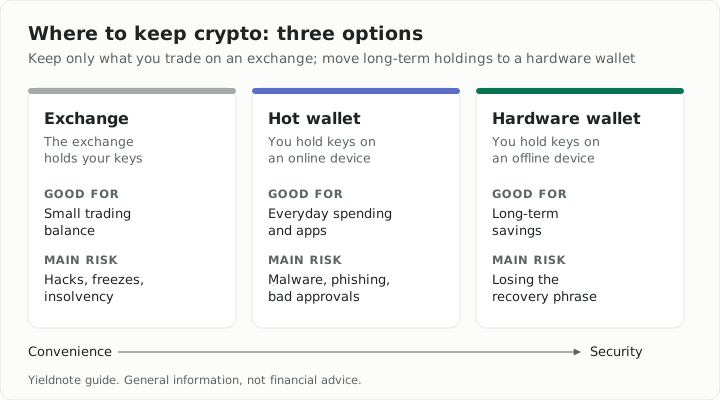
| Option | Who holds the keys | Good for | Main risk |
|---|---|---|---|
| Exchange account | The exchange | Small amounts you trade often | Hacks, freezes, insolvency |
| Hot wallet (phone or browser) | You, on an internet-connected device | Everyday spending, apps | Malware, phishing, bad approvals |
| Cold wallet (hardware) | You, on an offline device | Long-term savings | Losing the recovery phrase |
A practical split for most people: keep only what you actively trade on an exchange, a small spending balance in a hot wallet, and everything you plan to hold for months or years on a hardware wallet.
If you leave funds on an exchange, choose one that is licensed where you live, publishes proof-of-reserves reports, and supports app-based two-factor authentication.
Setting up a hardware wallet, step by step
1. Buy from the manufacturer
Order directly from the maker’s official website or an authorised reseller. Avoid marketplaces and second-hand devices: a tampered device can come with a recovery phrase someone else already knows.
2. Check the device on arrival
Make sure the packaging is sealed and the device starts with no existing setup. A genuine device will ask you to create a new wallet. If the box contains a pre-printed recovery phrase, do not use it. That is a known scam.
3. Install the official app
Download the companion app only from the manufacturer’s website or official app store listing. Search ads frequently impersonate wallet apps.
4. Create the wallet and write down the recovery phrase
The device generates a 12 or 24-word recovery phrase, also called a seed phrase. This phrase is your money: anyone who has it can take everything, from anywhere, without the device.
- Write it on paper or stamp it into a metal backup plate.
- Never type it into a phone or computer, photograph it, or store it in cloud notes or email.
- Store it somewhere safe from fire, water and other people. Many people keep a second copy in a separate secure location.
5. Consider a passphrase
Most hardware wallets support an optional passphrase, sometimes called the 25th word. It creates a separate hidden wallet, so a stolen recovery phrase alone is not enough. If you use one, back it up as carefully as the phrase itself; forgetting it means losing access.
6. Test your recovery before you deposit
Reset the device and restore it from your written phrase, or use the device’s built-in phrase check if it has one. Do this while the wallet is empty, not after it holds your savings.
7. Send a small test transaction first
Send a small amount from your exchange to the new wallet. Confirm it arrives, then send the rest.
8. Verify every address on the device screen
When receiving or sending, check the address on the hardware wallet’s own screen, not just your computer. Malware can swap addresses on your computer screen; the device display is the part an attacker cannot change.
The scams that drain wallets most often
- Fake support. No real support agent will ever ask for your recovery phrase. Anyone who asks is stealing.
- Phishing sites and fake apps. Lookalike websites and wallet apps prompt you to “verify” or “restore” your wallet. Bookmark official sites and use only those.
- Address poisoning. Scammers send tiny transactions from an address that looks like one you use, hoping you copy it from your history next time. Always copy addresses from a trusted source and check every character, not just the first and last few.
- Malicious approvals. Signing a token approval on a scam site can let a contract move your tokens later. Read what you are signing, and periodically review and revoke old approvals with a reputable approval-checking tool.
- “Guaranteed returns”. Promises of fixed daily profits, doubling schemes or giveaways that ask you to send crypto first are fraud.
Protect the accounts around your crypto
- Use an authenticator app or security key for two-factor authentication. SMS codes can be stolen through SIM-swap attacks.
- Use a unique, strong password for every exchange and email account, stored in a password manager.
- Secure the email address linked to your exchange; it is the key to password resets.
- Keep your phone and computer updated, and avoid installing pirated software.
Plan for inheritance
If something happened to you, could your family access your crypto? Write down which wallets and exchanges you use and how to find the recovery information, without writing the phrase itself in the same note. Store those instructions with your will or with someone you trust.
Tip: Treat your recovery phrase like cash in a safe, not like a password. Passwords can be reset; a lost or stolen phrase cannot.
Crypto assets are volatile and in many countries lightly regulated. This guide is general information, not financial advice. Only invest what you can afford to lose.